Frequently asked questions
for employers
Everything you need to know about publishing and promoting job ads on Jobportal
Publicera en platsannons
Registrera och skapa ett konto
Ett konto har skapats åt mig
Jobportal för samman jobbannonser i från öppna och offentliga källor för att på så vis kunna samla så många jobbannonser som möjligt på ett och samma ställe- En utav dessa källor är exempelvis Arbetsförmedlingens webbplats. I våra platsannonser framgår det dels om en annons är förvärvad ifrån en extern källa samt att dess ansökningar går till den adress som har angivits i källan.
Vi skapar automatiskt ett konto åt dig på Jobportal då vi återpublicerar en jobbannons från er ifrån en offentlig källa. Du har då självklart möjlighet att logga in på Jobportal för att redigera annonsen, exempelvis innehåll, utseende eller hur du vill att ansökningarna ska skickas.
Om inga ändringar görs omdirigeras ansökningarna alltid automatiskt till den adress som angetts i källan. När du får in ansökningar om din annons i Jobportal kommer vi att meddela dig via e-post. Vi rekommenderar att du ändrar ditt lösenord första gången du loggar in. Om du har några frågor, vänligen kontakta oss via våran kundtjänst så hjälper vi dig.
I didn't receive a new password.
Vi skickar det nya lösenordet till den e-postadress som du anger i fältet ”Har du förlorat ditt lösenord? – Återställ det här” på inloggningssidan. Vid behov kan du kontakta kundtjänst.
Radera ett konto
Om du önskar att radera ett konto som skapats åt dig, vänligen kontakta våran kundtjänst.
Publicera en jobbannons
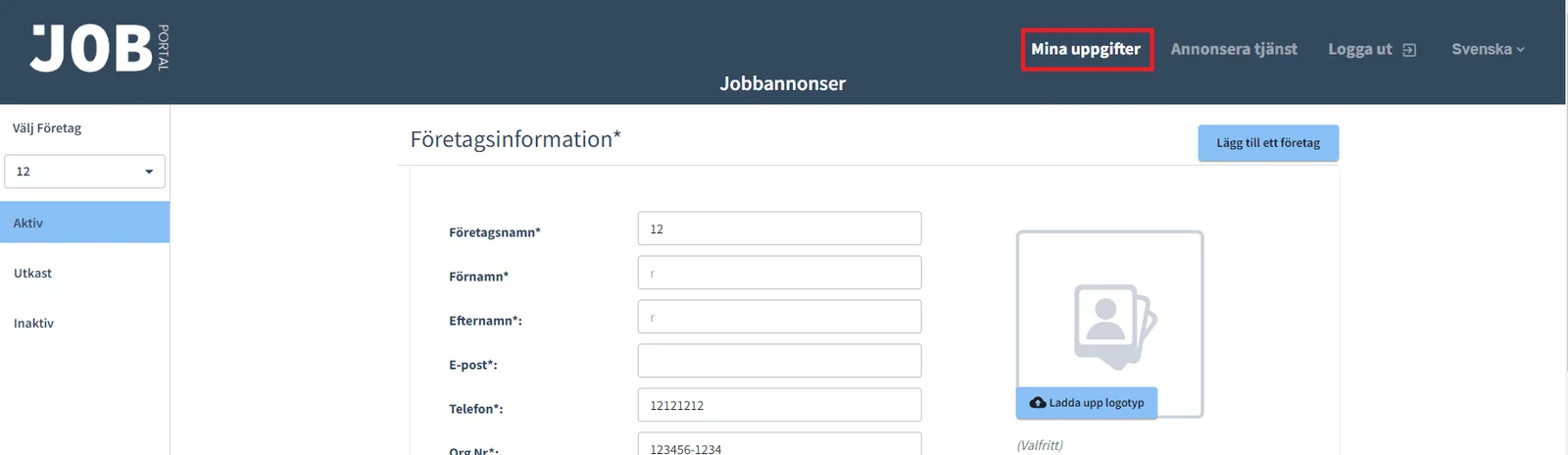
För att publicera en jobbannons måste du först logga in som arbetsgivare. Om du loggade in på webbplatsen för första gången efter registreringen måste du fylla i dina företagsuppgifter under My details. Lägg till företagsnamn, namn och e-postadress till den person som är ansvarig för rekryteringen, företagets telefonnummer, logotyp, organisationsnummer samt adress. Utöver detta kan du lägga till företagets webbadress samt en företagspresentation. Denna information kommer att visas i slutet av din jobbannons. Om jobbet har publicerats från en offentlig källa har en del av företagets information redan fyllts i.
Dela ett konto med en annan person
Du kan dela din företagsprofil med ytterligare delaktiga personer genom att lägga till deras namn och e-postmeddelanden under ”Min information”. De tillagda användarna får egna inloggningsuppgifter till samma e-postadress. Dessa personer får också samma e-postmeddelanden som profilskaparen samt tar del av samma information som profilskaparen. När du tar bort en användare från listan har de inte möjlighet att logga in på profilen med de uppgifter de tidigare fått. Du kan dock åter lägga till samma användare även om du tidigare har tagit bort denne. Denne kommer då att skickas nya uppgifter för att kunna logga in.
OBS Du kan inte lägga till en användare i arbetsgivarens profil som redan har registrerat sig som arbetssökande i Jobportal.
Återaktivera en jobbannons
Vårt system sparar utgångna jobbannonser, så att du kan gå tillbaka till tidigare annonser och se deras statistik. Du kan även aktivera en gammal jobbannons på nytt. Du hittar dina tidigare jobbannonser under ”Inaktiv”. Om du tidigare har köpt ett kampanjpaket för en annons som du vill aktivera på nytt kan du göra det utan kostnad – du debiteras inte för återaktiveringen. Om du även vill aktivera kampanjpaketet på nytt för samma annons kan du göra det genom att klicka på ”Köp kampanjpaket” i annonsen efter att den har aktiverats.
Jag kan inte publicera ett jobb
Om du får ett felmeddelande när du publicerar ett jobb, vänligen kontakta våran kundtjänst. We will contact you about your case as soon as we can.
Redigera eller radera en annons
Du kan redigera en jobbannons genom att logga in med dina inloggningsuppgifter och välja knappen ”Öppna”. Längst upp och längst ner i meddelandet hittar du knappen ”Redigera”. Kom ihåg att spara dina ändringar i annonsen genom att trycka på ”Publicera” i slutet av annonsen. Du kan även förhandsgranska annonsen innan du publicerar.
För att radera en annons loggar du in och klickar ”Ta bort” knappen under jobbannonsen.
Flera företag och annonser
Du kan lägga till flera företag under samma användarprofil. Du kan byta företag från vänster spalt på sidan och skapa unika jobbannonser och kampanjer för olika företag. Du kan publicera en ny platsannons genom att klicka på ”Annonsera tjänst” eller ”Skapa en ny jobbannons” och fylla i informationen i formuläret.
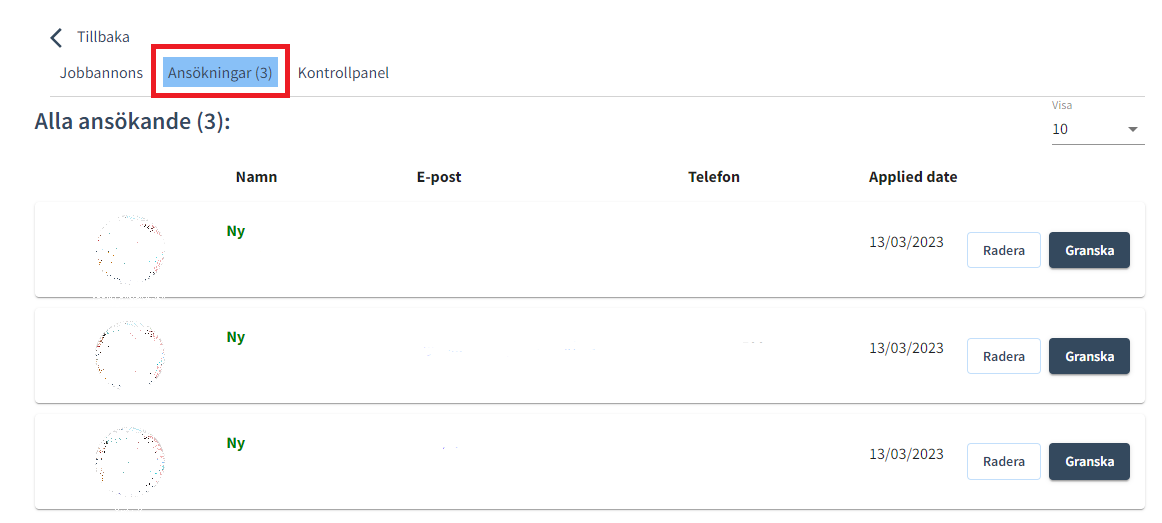
Du hittar de inkomna ansökningarna i den företagsprofil i platsannonsen. Du kommer att meddelas via e-post när du har fått nya ansökningar.
Jobportal läter dig kontakta de sökande direkt för att enkelt fortsätta med nästa steg i rekryteringen.
Jag kan inte hitta min jobbannons
Du kan logga in på din företagsprofil genom att ange e-postadressen och lösenordet du använde för att skapa den. Om du däremot har fått ett e-postmeddelande från oss om att ditt jobb är publicerat på Jobportal kan du logga in med de inloggningsuppgifter som anges i det här e-postmeddelandet. Vi rekommenderar att du alltid ändrar ditt lösenord vid första inloggningen. Du hittar utgångna jobbannonser i din profil under ”inaktiv”. Du kan återaktivera utgångna jobbannonser.
Du kan inte använda samma e-postadress för att registrera dig som arbetsgivare och som arbetssökande.
Om du inte kan logga in på din profil, vänligen kontakta vår kundtjänst via e-post, eller telefon.
Varför ska jag lägga upp ett jobb på Jobportal?
Att publicera en platsannons på Jobportal är idag den kanske billigaste och enklaste lösningen på marknaden för att nå arbetssökande. Tusentals människor besöker redan vår jobbsökningssida varje månad. Vårt besökarantal växer hela tiden och nya arbetssökande registrerar sig varje dag.
- Få dina ansökningar på ett ställe, där det är enkelt att jämföra sökande.
- Möjlighet att organisera sökande utefter kvalifikationer .
- Möjlighet att lämna anteckningar om sökanden för andra personer som är involverade i rekryteringen.
- Du kan bjuda in andra personer för att aktivt delta i rekryteringsprocessen.
- Du kan enkelt hålla kontakten med den sökande om hur rekryteringen fortskrider genom vårat ATS – Applicant Tracking System.
Om du vill se till att din annons når ut till rätt målgrupp så kommer våra kampanjpaket att se till detta. En professionellt riktad rekryteringsannonsering garanterar synlighet för din annons. Kampanjen ser också till att din platsannons syns där potentiella arbetssökande ägnar sin tid.
- Nå fler sökande och förfina ditt anseende som arbetsgivare på sociala medier.
- Hantera arbetssökande och skapa en positiv jobbsökarupplevelse för dem.
- Våra tjänster är idealiska för era första rekryteringar.
Campaign packages
Marknadsföring av jobbannonser
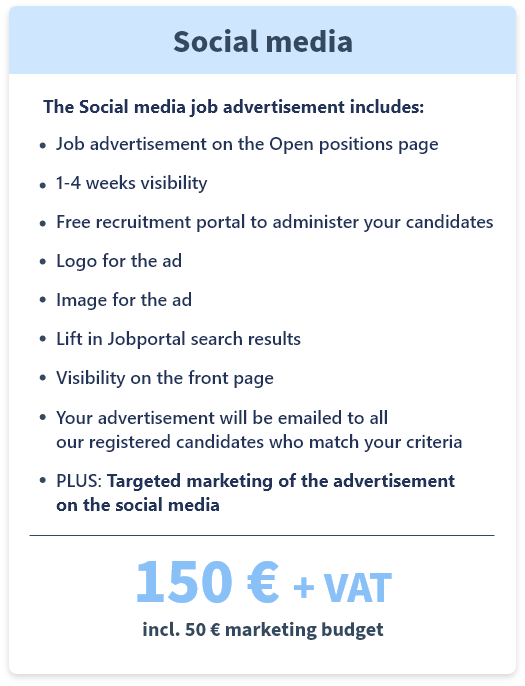
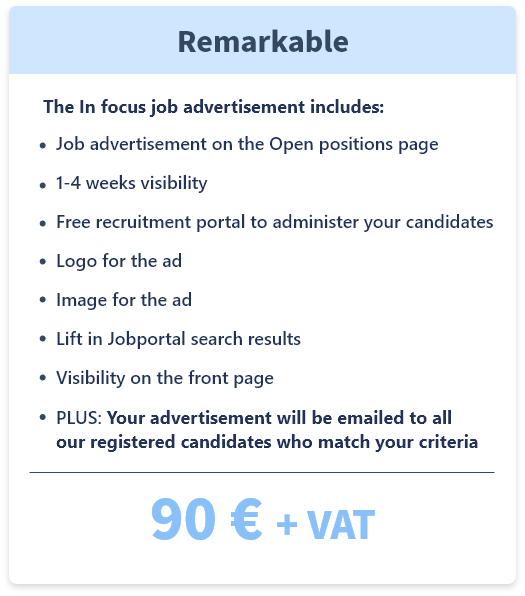
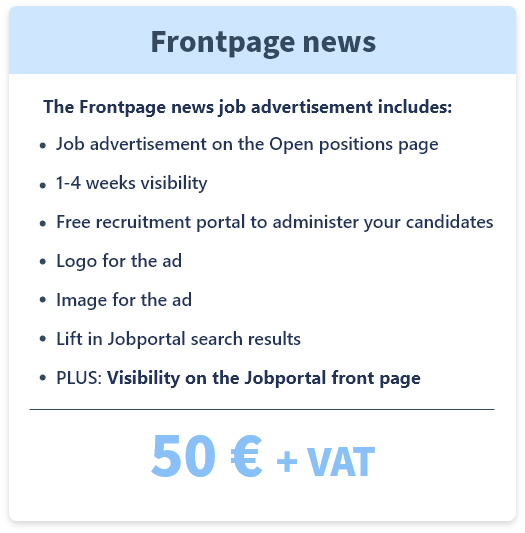
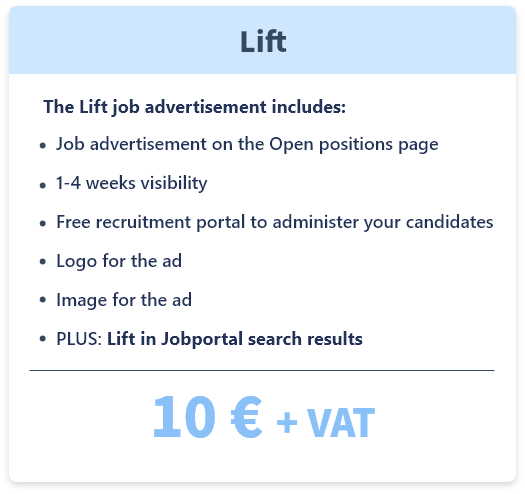
Du kan marknadsföra din jobbannons på Jobportal och sociala medier genom att köpa ett kampanjpaket. Jobportal har för närvarande fyra olika betalda kampanjpaket för att möta ditt företags rekryteringsbehov. För mer information om kampanjpaketen, klicka here.
Kampanjpaketet använder färdiga designmallar från Jobportal. För närvarande kan kundernas egna design- och layoutmallar inte användas i marknadsföringen. Vi rekommenderar dock att du lägger till din företagslogotyp och eventuella marknadsföringsbilder i platsannonsen. Du kan också använda olika textstorlekar och typografi för att få din annons att sticka ut.
Vilka är fördelarna med Jobportals kampanjer?
Kampanjer tar jobbannonseringen dit där de potentiella kandidaterna finns. Exponering på potentiella kandidaters smarta enheter och sociala medier lockar fler passiva arbetssökande. Passiva arbetssökande är de som är redo att byta jobb men som inte aktivt letar efter ett nytt eller är inriktade på specifika företag och deras lediga tjänster.
Många företag vill inte betala för dyra rekryteringstjänster för att hitta rätt medarbetare eftersom detta är dyrt. De vill självklart satsa på att rekrytera sina första medarbetare men inte nödvändigtvis betala höga summor för detta. Jobportal skapades för att fylla denna lucka. Vi vill erbjuda de mindre aktörerna på marknaden möjligheten att framgångsrikt rekrytera och hitta nya medarbetare. Vi erbjuder arbetsgivare prisvärda kampanjpaket för att öka synligheten för deras annonser. Genom att annonsera ett jobb på Jobportal kan vi nå aktiva arbetssökande via rekryteringskanaler, e-post och riktade sociala medier.
Det mest lönsamma kampanjpaketet för att nå ut till arbetssökande är Kampanjpaket – Sociala Medier. Jobbannonsen visas på förstasidan, först i sökresultaten och riktas på sociala medier för 500 kronor eller det belopp du anger. Annonseringen kommer att utföras av en professionell marknadsföringsbyrå – Mediaspark.
Varför välja riktad digital annonsering med Jobportal?
- De mest potentiella kandidaterna kanske inte aktivt letar efter ett nytt jobb, men ändå är öppna för nya möjligheter.
- Riktad digital annonsering kostar en bråkdel av priset på ett rekryteringsföretag.
- Jobportals marknadsföringsbyrå ansvarar för att annonsen på sociala medier distribueras effektivt till målgruppen.
- Jobportals marknadsföringsbyrå har aktuell expertis i den snabbt föränderliga digitala världen.
Visste du att annonsering av din jobbannons på sociala medier begränsas av diskriminerande metoder? De som har gjort annonsriktning vet redan hur en dålig riktning kan förstöra resultatet av en hel kampanj. En dålig rekryteringskampanj kan påverka andra kampanjer som ditt företag driver negativt, kampanjer vilka hanteras från samma konto. Vi vill så klart inte se att detta händer dig och uppmuntrar dig därför att använda webbplatser som redan har identifierats som jobbsökningswebbplatser för jobbannonsering på sociala medier.
Webbplatser som redan är identifierade som associerade med jobbsökning på sociala medier, till exempel Jobportal, kommer att nå fram till sin målgrupp bättre.
I genomsnitt får en jobbannons med kampanjpaketet – social media stjärna som beställts utan någon extra budget 250 läsningar. Detta påverkas av faktorer som själva tjänsten, branschens popularitet samt företagets image. För de mest populära branscherna har kampanjpaketet – Sociala Medier utan extra budget i genomsnitt 450 läsningar.
Tip!
Visibility can be increased later with promotional packages
Not sure which solution is right for you?
Send us a message — we’ll be happy to assist you.
We search,
you choose.
Telefon: 010-251 50 61
E-post: kundtjanst@jobportal.se